# Welcome to Townhall Docs

Townhall is a comprehensive super-app designed to empower your Protocol or DAO's community with seamless governance tools and features.&#x20;

From Discussions to On-chain and Off-chain Proposals, Delegation, Treasury analytics, Bounties, and grants, Townhall offers a unified user experience for engaging your community and facilitating contributions to your DAO's growth.

> Built by the team behind Polkassembly, the governance solution for Polkadot's advanced on-chain governance, Townhall brings years of expertise in decentralized governance to your fingertips. With Polkassembly, we have facilitated the processing of over $300mn+ in grants, contributing to the growth of the entire Polkadot & Kusama ecosystem and our 60+ partners. Read more about Polkassembly [here](https://polkassembly.io/)

### What Makes Townhall Different

* **Social Nature**: Townhall stands out with its social nature, fostering community engagement and collaboration through intuitive discussion features and interactive tools.
* **Ease of Use**: With a user-friendly interface and streamlined workflows, Townhall makes governance management effortless for both administrators and community members.
* **Modular Infrastructure**: Townhall's modular infrastructure allows for easy integration with popular governance tools and platforms such as Snapshot, Discourse, and Tally, enhancing flexibility and scalability.
* **Secure Authentication**: Townhall offers secure login options via Privy and SAFE, ensuring user privacy and data security while simplifying the authentication process

<figure><img src="https://2078393761-files.gitbook.io/~/files/v0/b/gitbook-x-prod.appspot.com/o/spaces%2F2fOimh9tyuFd9yQI8n0M%2Fuploads%2FYid3C58hr7hnwdWK6UB4%2Fimage.png?alt=media&amp;token=1054bb0e-1000-4d20-9056-58db54f255f2" alt="" width="563"><figcaption></figcaption></figure>

## Quick links

{% content-ref url="/pages/MeKZyWturhNaJLkT411k" %}
[About Townhall](/townhall/overview/about-townhall)
{% endcontent-ref %}

{% content-ref url="/pages/DtKO904hqvZej2yVB7oI" %}
[Features](/townhall/overview/features)
{% endcontent-ref %}

## Get Started

We've put together some helpful guides for you to get setup with our product quickly and easily.

{% content-ref url="/pages/BbpbBewlrCZxylSXPLKg" %}
[TL;DR](/townhall/using-townhall/tl-dr)
{% endcontent-ref %}

{% content-ref url="/pages/5YilMvya4ewGJeENYDi6" %}
[For Admins](/townhall/using-townhall/for-admins)
{% endcontent-ref %}

{% content-ref url="/pages/ytTz9RBTpUHNDiUaz7WP" %}
[For Users](/townhall/using-townhall/for-users)
{% endcontent-ref %}


# About Townhall

This documentation provides you with an overview of Townhall, its key features, and a guide on how to get started. Whether you are a DAO looking to create a **House** for your organization, or developing custom voting strategies, you will find the resources you need within this documentation.

## What is Townhall?

Townhall is a social organization management super app designed for DAOs, DeFi protocols, and Communities. It enhances the governance experience  by aggregating discussions , on and off chain proposals , treasury analytics and  delegation. The modular infrastructure offers high customization options, and provides for a seamless multi-governance platform. Townhall results are easy to verify and hard to contest.

<figure><img src="https://2078393761-files.gitbook.io/~/files/v0/b/gitbook-x-prod.appspot.com/o/spaces%2F2fOimh9tyuFd9yQI8n0M%2Fuploads%2F2ClGSpv7TOjU6ovIb5ea%2Fimage.png?alt=media&amp;token=f6589ebc-673b-432b-bac0-359aa7191630" alt="" width="351"><figcaption></figcaption></figure>

## How does it work ?

The Townhall platform has **Houses** as the central gate to a protocol or DAO.&#x20;

#### Features Overview

* **Discussions**: Foster open dialogue and collaboration within your community through Townhall's discussion platform.
* **Onchain & Offchain Proposals**: Streamline proposal submission and decision-making processes, both on-chain and off-chain, for efficient governance management.
* **Delegation**: Empower community members to delegate their voting power and participate in decision-making processes effectively.
* **Treasury Analytics**: Gain valuable insights into your treasury's financial activities and performance with comprehensive analytics tools.
* **Bounties and Grants**: Encourage community participation and contributions through bounties and grants, facilitating growth and innovation within your ecosystem.

## Video overview

Here's a video overview of our product:

<table data-view="cards"><thead><tr><th></th><th></th><th></th><th data-hidden data-card-target data-type="content-ref"></th></tr></thead><tbody><tr><td></td><td>Create a House</td><td></td><td><a href="/townhall/product-guides/houses/create-a-house">Create a House</a></td></tr><tr><td></td><td>Create a Proposal (off-chain)</td><td></td><td><a href="/townhall/product-guides/proposals/create-a-proposal">Create a Proposal</a></td></tr><tr><td></td><td>Voting on a Proposal </td><td></td><td><a href="/townhall/product-guides/voting/how-to-vote">How to Vote</a></td></tr><tr><td></td><td>Importing Snapshots</td><td></td><td><a href="/townhall/product-guides/integrations/importing-snapshot">Importing Snapshot</a></td></tr><tr><td>Importing Discussions from Discourse</td><td></td><td></td><td><a href="/townhall/product-guides/integrations/discourse">Discourse</a></td></tr></tbody></table>


# Features

Townhall implements modular infrastructure providing for high customization and easy integration with  governance platforms

## Key Features

* **Unified platform:** Enables DAOs to have discussions, off-chain votes & on-chain votes, delegate voting power and manage treasury all in one place
* **Multiple Voting Systems:** Choose from Single Choice, Approval Voting, Quadratic Voting, and more.
* **Ease of Use :** Import from existing Snapshot, Discourse and Tally accounts
* **Free Usage:** Create Houses, proposals, and participate in governance without incurring any gas fees.
* **Personalized User Experience** : Manage your dashboard and social feed for a highly interactive governance interface


# Houses

A House is the central hub for an organization's community on Townhall which can be viewed by anyone visiting the platform. It holds all important details and settings related to the organisation.

{% content-ref url="/pages/27hIMR8OzAwi704s9OTU" %}
[What is a House?](/townhall/product-guides/houses/what-is-a-house)
{% endcontent-ref %}

{% content-ref url="/pages/JDtYK8xVn5bKJemEhHDQ" %}
[Create a House](/townhall/product-guides/houses/create-a-house)
{% endcontent-ref %}

{% content-ref url="/pages/0P6fkbKuLUn8rz1magRm" %}
[Settings](/townhall/product-guides/houses/settings)
{% endcontent-ref %}


# What is a House?

A House acts as your organization's account on Townhall, visible to anyone exploring the platform. [It's a dashboard the organization. ](#user-content-fn-1)[^1]Each house has it's social feed , proposal and discussion listings, delegation dashboard, treasury dashboard and house settings. It serves as an information source for users by specifying key activities and guidelines to interact in the community.&#x20;

### How to access a House?

Houses are listed upon arrival on [Townhall ](https://www.townhallgov.com/)and can be filtered by the organization or the ENS name used to create the house. You can access all details associated to the house by clicking on House of choice.

<figure><img src="https://2078393761-files.gitbook.io/~/files/v0/b/gitbook-x-prod.appspot.com/o/spaces%2F2fOimh9tyuFd9yQI8n0M%2Fuploads%2FihvQwRnGJf4TG02svIS2%2Fimage.png?alt=media&amp;token=19906007-88af-4d2f-9f71-1701fb9b3f50" alt=""><figcaption><p>Houses Dashboard</p></figcaption></figure>

<figure><img src="https://2078393761-files.gitbook.io/~/files/v0/b/gitbook-x-prod.appspot.com/o/spaces%2F2fOimh9tyuFd9yQI8n0M%2Fuploads%2FfIG1bBIAKhAZU9Y7nwU5%2Fimage.png?alt=media&amp;token=650368f7-56ab-4442-9a01-6d5e643d373a" alt=""><figcaption><p>House Overview</p></figcaption></figure>

### Proposal search&#x20;

You can browse through all of House's proposals including active, pending, and closed proposals, as well as those created by core members.

<figure><img src="https://2078393761-files.gitbook.io/~/files/v0/b/gitbook-x-prod.appspot.com/o/spaces%2F2fOimh9tyuFd9yQI8n0M%2Fuploads%2FWI9pw84OYIw3fpw1H5SE%2Fimage.png?alt=media&amp;token=7c142039-eb72-4e55-a1a6-c5a4552da4f5" alt=""><figcaption><p>Proposal Listing</p></figcaption></figure>

### Joining a House

If you want to have a quick access to certain Houses you can join them from the directory of all Houses or through the house's individual page by clicking the **Join** button. It will create a shortcut for the house on the right sidebar.

<figure><img src="https://2078393761-files.gitbook.io/~/files/v0/b/gitbook-x-prod.appspot.com/o/spaces%2F2fOimh9tyuFd9yQI8n0M%2Fuploads%2FiKO5jcuubj9ZiEPDyZWs%2Fimage.png?alt=media&amp;token=e2b205f0-029b-43c3-95f4-909a35da192c" alt=""><figcaption></figcaption></figure>

###

[^1]: what does this mean?


# Create a House

This page guides you step by step through the process of creating a house

{% hint style="info" %}
If already have a House created on townhall dashboard, you can simply[ claim](/townhall/product-guides/houses/claim-your-house) it by logging in.
{% endhint %}

#### 1. Set or get an ENS domain for your space <a href="#id-1.-set-or-get-an-ens-domain-for-your-space" id="id-1.-set-or-get-an-ens-domain-for-your-space"></a>

* Tap the <img src="https://2078393761-files.gitbook.io/~/files/v0/b/gitbook-x-prod.appspot.com/o/spaces%2F2fOimh9tyuFd9yQI8n0M%2Fuploads%2F5gbnZBHUYIV4V6crTFuZ%2Fimage.png?alt=media&amp;token=378b77fb-a867-4dca-9fb6-1d880cc6d7fa" alt="" data-size="line"> button in the left sidebar to create a new house.

{% hint style="info" %}
If you already own an ENS domain, make sure you are connected to [townhallgov.com](https://docs.townhallgov.com/townhall/product-guides/houses/www.townhallgov.com) with the **Ethereum address** that is set as **controller of your ENS name** (if you are confused about the difference between ENS Registrant and Controller, have a read [here](https://docs.ens.domains/permanent-registrar-faq#what-is-the-registrant-and-controller-of-a-name)).
{% endhint %}

* If the above condition is met, your ENS name will appear. To confirm it's correct, click on it.
* If you **don't own an ENS domain** you will have to register one. Enter a name that suits the needs of your DAO in the `register a new domain` field and click `Register.` You can then follow [Register an ENS domain](/townhall/product-guides/houses/create-a-house/register-an-ens-domain) and come back here for step 2 once domain has been registered.

#### 2. Create your profile <a href="#id-3.-create-your-profile" id="id-3.-create-your-profile"></a>

To complete the profile of your House you have to enter a name for your DAO, a House logo and a description. You can update this information after you have finished creating the House.

#### **3. Set your very first strategy** <a href="#id-4.-set-your-very-first-strategy" id="id-4.-set-your-very-first-strategy"></a>

Your house can combine up to **8** voting strategies which will be responsible for calculating the users' voting power. The setting affects all proposals that will be created for that house.

For the initial setup you have to choose one of the three following strategy types to then specify the strategy details:

{% hint style="info" %}
Each strategy is taking into account the assets that belong to the voting address **at the time of proposal creation**, not at the time of voting.
{% endhint %}

1. **Token weighted voting:** Voting power is weighted by the amount of the token held by the user. The token can be an ERC-20, ERC-721 or ERC-1155 token standard.
2. **One person, one vote:** This option can be used in two different ways: <mark style="color:purple;">**Whitelist voting**</mark> lets you specify a list of addresses that will be able to vote&#x20;
3. **Custom setup:** If you feel ready to dive deeper into the custom setup here are a few hints that you may find useful:

* You can select up to 8 different strategies. Voting power is cumulative.
* Network can be selected individually for each strategy. This way you can leverage multi-chain voting power calculation.
* It is possible to set a different symbol for each strategy. They will be displayed on the proposal page.
* You can write a custom voting strategy if the existing ones are the sufficient for your needs. Have a look at to learn more.

### Your House is live ! Invite people to join :envelope:  <a href="#your-space-is-live" id="your-space-is-live"></a>


# Register an ENS domain

To create your house on Townhall you need to have an ENS domain. This page will take you through the steps to create an ENS domain.

{% hint style="info" %}
**ENS on Ethereum Mainnet**&#x20;

To register a house on \<Townhall> you need an ENS domain on the **Ethereum Mainnet** even if you want to use Ethereum Testnet or any other network (Binance Smart Chain, xDAI, etc).&#x20;
{% endhint %}

If you already have an ENS domain, feel free to skip this and follow the [Create a House ](/townhall/product-guides/houses/create-a-house)guide.

### **Creating an ENS Domain** <a href="#creating-an-ens-domain" id="creating-an-ens-domain"></a>

1. Search for the availability of your name on Townhall's `Create a house` page
2. Search for the availability of your name on ENS by following this link:  <https://app.ens.domains/>&#x20;
3. Connect your wallet by tapping on the `Connect` button on the top left corner of your screen.&#x20;
4. Make sure your wallet has enough balance to make the transaction successful and that you selected the Ethereum Mainnet (or Goerli Testnet for the demo page).
5. Confirm all transactions for the three steps from your chosen wallet provider.![](https://lh5.googleusercontent.com/d11GatKZ1P25f-uE1RphuiPEEf1V5ni-zX4hF4CKJYWaZUKWojmdbDw5wxxudYRVJMzoGxmP9MNhsh-lYVJEWdFu5zurWD1DXOkoYr6gMznyIRf0roFCuBXaimPdbmiqx_QNnqY=s0)

You have now successfully registered on ENS! Additionally, you can also make your Ethereum address point to an ENS name by clicking on ‘Set Reverse Record’ or by going to 'My Account' and then selecting 'Reverse record' and completing the transaction.

**Congratulations! You have created your domain on ENS. You are now ready to create your house on Townhall.**&#x200B;​

{% content-ref url="/pages/JDtYK8xVn5bKJemEhHDQ" %}
[Create a House](/townhall/product-guides/houses/create-a-house)
{% endcontent-ref %}


# Claim your House

This page guides you step by step through the process of claiming a house

1. Login with a wallet access that has admin rights to your house's ENS or Snapshot Account
2. Navigate to your House from the House dashboard or by simply searching in the right side panel.
3. Navigate to House settings and you will now have access to admin rights.&#x20;

You can now setup your house preferences and add members to your House.

#### &#x20;<a href="#id-1.-set-or-get-an-ens-domain-for-your-space" id="id-1.-set-or-get-an-ens-domain-for-your-space"></a>


# Settings


# Proposals

Proposal is the key element of the voting system. It presents a change suggestion related to a specific organization and enables eligible users to cast their vote.

A specific [voting system](/townhall/product-guides/strategies/voting-strategies) (single choice, weighted, quadratic, and others) can be selected individually for each proposal.

Voting power for each user is calculated on the basis of the voting strategies selected by the [house](/townhall/product-guides/houses/settings).

## Who can create a proposal?

Any user who has joined a house is eligible to create a proposal in that house.

{% content-ref url="/pages/DkvwnvJLCyMFtsgV6XWr" %}
[Create a Proposal](/townhall/product-guides/proposals/create-a-proposal)
{% endcontent-ref %}

{% content-ref url="/pages/k2qTU7OSeI5JNjKVETzo" %}
[Edit a Proposal](/townhall/product-guides/proposals/edit-a-proposal)
{% endcontent-ref %}


# Create a Proposal

Here's an interactive demo , Follow the cursor highlight to learn by engaging.

{% @arcade/embed flowId="4xfhmDw0cFzrpLSAeixt" url="<https://app.arcade.software/share/4xfhmDw0cFzrpLSAeixt>" %}

### Step 1 : Select the House

Navigate to the house you want to create a proposal for.&#x20;

{% hint style="info" %}
You need to join the house to be able to create a proposal.
{% endhint %}

### Step 2 : Fill in the deets

1. Provide the details needed for creating a proposal:

* Title&#x20;
* Description
* Voting Type
* Voting Period
* Tags(optional)
* Link Discussion(optional)

<figure><img src="https://2078393761-files.gitbook.io/~/files/v0/b/gitbook-x-prod.appspot.com/o/spaces%2F2fOimh9tyuFd9yQI8n0M%2Fuploads%2FJmV9IteU8D1z0PmRVajV%2Fimage.png?alt=media&amp;token=376977e3-c9de-4e82-be90-8daabb19a826" alt=""><figcaption></figcaption></figure>

### Step 3 : Save and Preview

Review details of your proposal carefully and once everything seems good, click on Create Proposal button&#x20;

<figure><img src="https://2078393761-files.gitbook.io/~/files/v0/b/gitbook-x-prod.appspot.com/o/spaces%2F2fOimh9tyuFd9yQI8n0M%2Fuploads%2FpS72U2KdYGKT4lDjmxzb%2Fimage.png?alt=media&amp;token=36926e3f-8104-430b-9bea-9b31f379b4e6" alt=""><figcaption></figcaption></figure>

### Your proposal is now live on Townhall! Share with your network and invite them to vote!


# Edit a Proposal

{% hint style="warning" %}
Documentation will be available soon. Please check back later or write to us at <dev@townhallgov.com> for support.
{% endhint %}


# Discussions

Discussions is a space for your community to interact and converse around important topics , active proposals, major decisions or just chat about expectations.

{% hint style="success" %}
Discussions can be used to engage with community and then link to a proposal as a testimonial of community opinions .
{% endhint %}


# Start a discussion

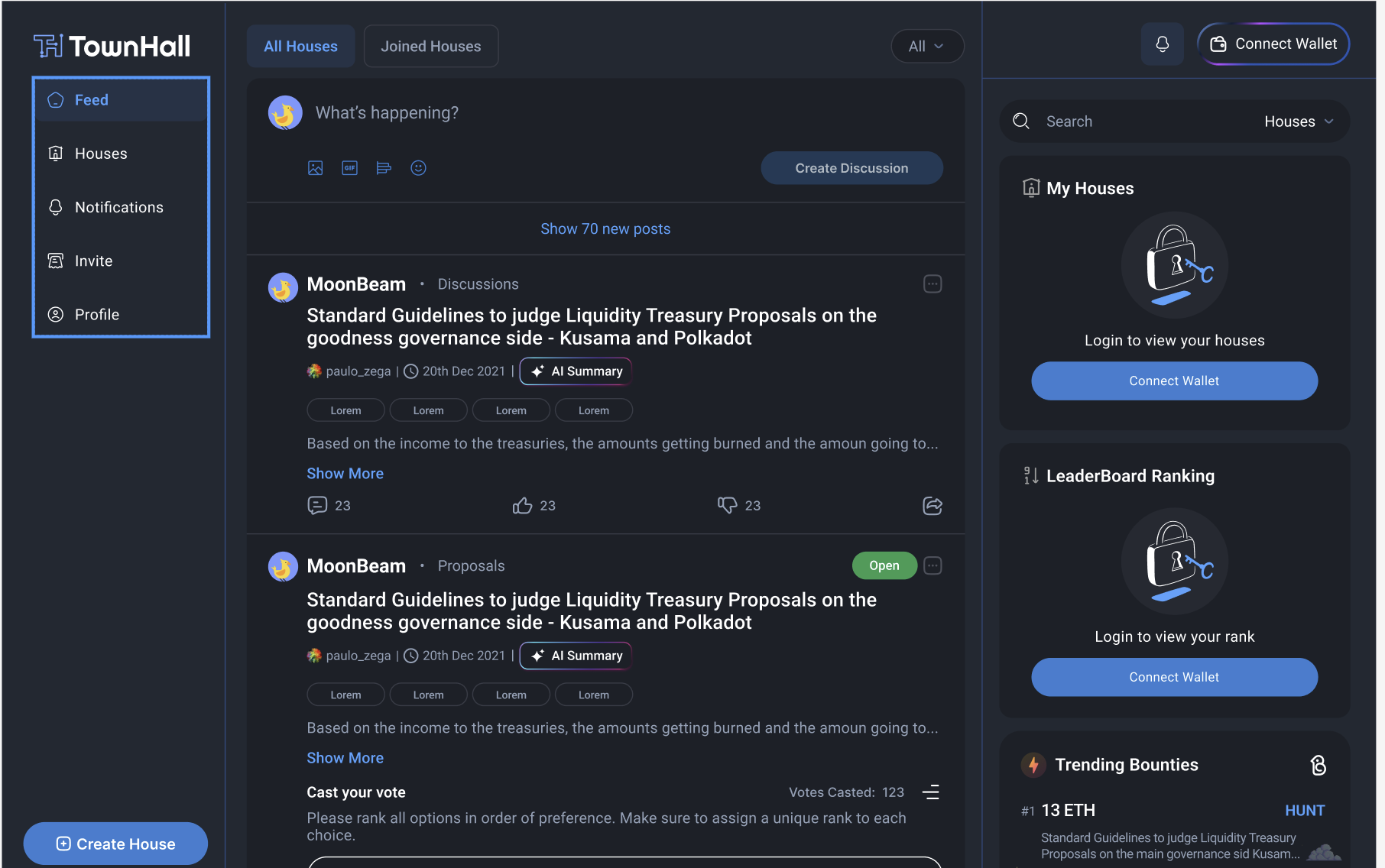
You can start a discussion directly through your social feed. Alternatively you can navigate to a house and create discussion by following the steps below.

### Step 1 : Select the House

Navigate to the house you want to create a discussion for.&#x20;

{% hint style="info" %}
You need to join the house to be able to create a discussion.
{% endhint %}

### Step 2 : Initiate a Discussion

* Navigate to the Discussions tab and click on <img src="https://2078393761-files.gitbook.io/~/files/v0/b/gitbook-x-prod.appspot.com/o/spaces%2F2fOimh9tyuFd9yQI8n0M%2Fuploads%2Fg7Q79cmALcVNNaDUSqu6%2Fimage.png?alt=media&amp;token=4bce06d0-5586-4fab-bc31-07180373ceaa" alt="" data-size="line">button on top right side
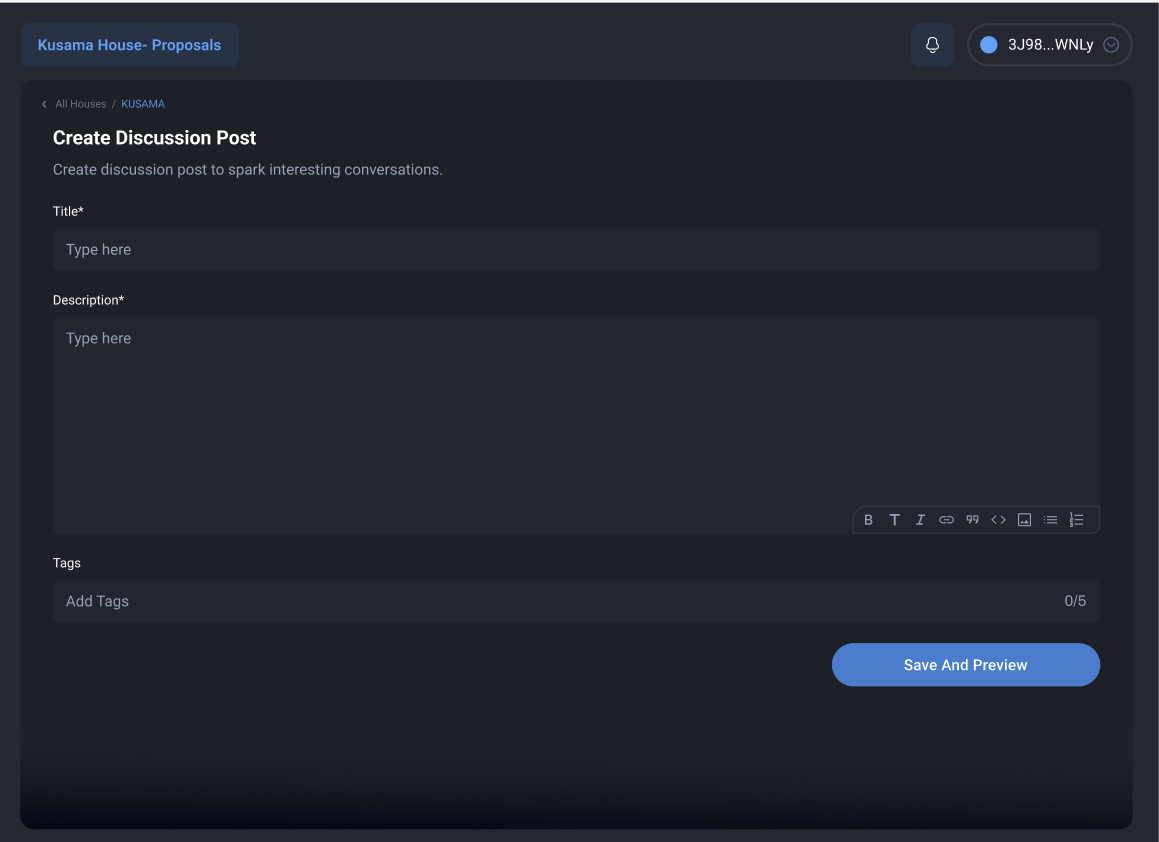
* Add the details for your discussion : Title, Description and Tags(optional)
<figure><img src="https://2078393761-files.gitbook.io/~/files/v0/b/gitbook-x-prod.appspot.com/o/spaces%2F2fOimh9tyuFd9yQI8n0M%2Fuploads%2FuuHMxvLvWDY2FKzd7qoU%2Fimage.png?alt=media&amp;token=cec7ee5d-b51a-4799-a4b8-90f663b67313" alt=""><figcaption></figcaption></figure>

### Step 3 : Save and Preview

Review details of your discussion carefully and once everything seems good, click on Create Discussion button&#x20;

<figure><img src="https://2078393761-files.gitbook.io/~/files/v0/b/gitbook-x-prod.appspot.com/o/spaces%2F2fOimh9tyuFd9yQI8n0M%2Fuploads%2FE4O1tlHuSGkZ6w9tZfol%2FAmongUsDiscussGIF.gif?alt=media&amp;token=3f56561a-b3c9-4b46-b17f-b9ef5bcb467a" alt="" width="241"><figcaption></figcaption></figure>

### Your discussion is now live on Townhall! Share with your network and invite them to join the conversation!


# Voting

Learn how you can submit your vote on a proposal and how your voting power is calculated.

&#x20;

<figure><img src="https://2078393761-files.gitbook.io/~/files/v0/b/gitbook-x-prod.appspot.com/o/spaces%2F2fOimh9tyuFd9yQI8n0M%2Fuploads%2FZjuoNX0n4XrMiCaoZLJN%2FSpongeBobSpongeBobMailGIF.gif?alt=media&amp;token=7fbc7c0d-abc0-4c73-ba4c-c9c9cf07dfa0" alt="" width="249"><figcaption></figcaption></figure>

## Who can Vote?

* Right to vote is defined by a house according to their governance strategy. You can view a house's strategy in the House Settings Tab.
* You can also verify your voting power on the house overview page![](https://2078393761-files.gitbook.io/~/files/v0/b/gitbook-x-prod.appspot.com/o/spaces%2F2fOimh9tyuFd9yQI8n0M%2Fuploads%2FHMiEynamYKA1iauBUStE%2Fimage.png?alt=media\&token=e8805519-f074-4122-a34e-30e80b7811ee)
* If you have a non-zero value for your voting power , you are eligible to vote

{% hint style="info" %}
In most cases you will be required to have a sufficient amount of tokens in the connected wallet. The token balance for such strategies is calculated at the time of proposal creation.
{% endhint %}

###


# How to Vote

### Vote via Social Feed

* Select appropriate choice(s) and click on vote button
* Optional : Add a comment with your vote
* Sign the message via your wallet provider when prompted

Share  with your network and invite them to vote !

### Vote via Proposal Listing

* Navigate to an active proposal you wish to vote on
* Select the appropriate choice(s) as mentioned in the right panel
* Optional : Add a comment with your vote
* Sign the message via your wallet provider when prompted
* Share  with your network and invite them to vote !

<figure><img src="https://2078393761-files.gitbook.io/~/files/v0/b/gitbook-x-prod.appspot.com/o/spaces%2F2fOimh9tyuFd9yQI8n0M%2Fuploads%2FD8Kn0IVdvnFjxmOKTMou%2FDespicableMeMinionsGIF.gif?alt=media&amp;token=07a28064-9196-4589-bbed-1f189420d549" alt="" width="249"><figcaption></figcaption></figure>

[Congratulations!🎉 Your vote will be recorded ](#user-content-fn-1)[^1]

[^1]:


# Voting Types

Voting Types are used to define vote methodology at the time of proposal creation. It is crucial to define and is set to derive desired outcomes for the creator's use case.

<details>

<summary>Single Choice Voting </summary>

User can choose one out of the provided options.

</details>

<details>

<summary>Approval Voting</summary>

User needs to either approve or disapprove of each provided option. It is mandatory to provide a stance on each listed option.

</details>

<details>

<summary>Quadratic Voting</summary>

Users can choose to allocate more voting power to  preferred options. Ensure  distributing  votes accordingly.

</details>

<details>

<summary>Rank Choice Voting</summary>

Users are required to rank all options in order of preference. Make sure to assign a unique rank to each choice

</details>

<details>

<summary>Weighted Voting</summary>

Users can assign different weights to their votes. Ensure allocating weights to each option as per preference of choice

</details>

<figure><img src="https://2078393761-files.gitbook.io/~/files/v0/b/gitbook-x-prod.appspot.com/o/spaces%2F2fOimh9tyuFd9yQI8n0M%2Fuploads%2FcYG4jkSQiJxoG5Hh6oD1%2FAmazedMinionGIF.gif?alt=media&amp;token=be680894-19ec-470e-9c03-53c2eb282461" alt=""><figcaption></figcaption></figure>


# Delegation

Delegation allows users to transfer their voting power to another participant, known as a delegate, facilitating decision-making without active involvement.

<figure><img src="https://2078393761-files.gitbook.io/~/files/v0/b/gitbook-x-prod.appspot.com/o/spaces%2F2fOimh9tyuFd9yQI8n0M%2Fuploads%2FwuUt1KUW2OdcmqrketeM%2FDelegateShieldGIF.gif?alt=media&amp;token=d6fde750-2630-4936-ab7c-322513f47765" alt=""><figcaption></figcaption></figure>

{% content-ref url="/pages/Q6g5OazSOrqRtCL9Xwjh" %}
[How to Delegate](/townhall/product-guides/delegation/how-to-delegate)
{% endcontent-ref %}


# How to Delegate

1. Navigate to house of choice&#x20;
2. Go to Delegate Dashboard from left side panel
3. Enter the address you want to delegate to or search from top delegate profiles on dashboard
4. Click **Confirm** to save your delegation.
5. Pay the gas fee as prompted by your wallet and sign the transaction

Wohoo! Your votes have been delegated✔️


# Treasury

Treasury analytics provide valuable insights into the financial activities and performance of the decentralized autonomous organization (DAO) or governance platform's treasury. These analytics help stakeholders make informed decisions regarding fund management, allocation, and strategic planning.

<figure><img src="https://2078393761-files.gitbook.io/~/files/v0/b/gitbook-x-prod.appspot.com/o/spaces%2F2fOimh9tyuFd9yQI8n0M%2Fuploads%2FLYlAKnnajta5saBR6ikX%2FSpongebobAnalyticsGIF%20(2).gif?alt=media&amp;token=2572abab-0c83-4a1d-8f03-dc9b96f84523" alt="" width="249"><figcaption></figcaption></figure>

### Key Metrics and Graphs

1. **Wallet Overview**: Gain insight into the treasury's asset composition and volume breakdown.
2. **Top Beneficiaries**: Monitor key beneficiary accounts and their corresponding asset values derived from the treasury.
3. **Treasury Asset Distribution**: Get a comprehensive view of the distribution of assets within the treasury.
4. **Total Stacked Graph**: Track the flow of assets in and out of the treasury, providing a visual representation of net treasury movements over time.

<figure><img src="https://2078393761-files.gitbook.io/~/files/v0/b/gitbook-x-prod.appspot.com/o/spaces%2F2fOimh9tyuFd9yQI8n0M%2Fuploads%2FpU16d8RzyqA6fmNzgsVh%2FClashRoyaleRascalsGIF.gif?alt=media&amp;token=c77c140f-7a97-4ae7-80c6-b459ab777408" alt="" width="249"><figcaption><p>Connect your Treasury</p></figcaption></figure>

<br>

{% content-ref url="/pages/q3i6VYRUPSCXfBiM3qp1" %}
[Connecting Treasury](/townhall/product-guides/treasury/connecting-treasury)
{% endcontent-ref %}


# Connecting Treasury

This page guides you step by step through the process of connecting your DAO Treasury

{% hint style="warning" %}
This content will be available soon
{% endhint %}


# Bounties

Bounty Bird is a social bounty tool seamlessly integrated into Townhall Governance , empowering DAOs, communities, and organizations to effortlessly create bounties on social media platforms.

<figure><img src="https://2078393761-files.gitbook.io/~/files/v0/b/gitbook-x-prod.appspot.com/o/spaces%2F2fOimh9tyuFd9yQI8n0M%2Fuploads%2FNVKArsBcd1ldNEZ0fWgA%2FBirdBlueGIF.gif?alt=media&amp;token=95a152c9-2457-43dc-bbe9-cc2a608c72ce" alt="" width="249"><figcaption></figcaption></figure>

Create Bounties to boost engagement and participation in your House. Leverage your network to resolve tasks, test products , review documentation and much more

<figure><img src="https://2078393761-files.gitbook.io/~/files/v0/b/gitbook-x-prod.appspot.com/o/spaces%2F2fOimh9tyuFd9yQI8n0M%2Fuploads%2FEAWC5yJZSdZWCUbR8vMb%2Fimage.png?alt=media&amp;token=156d50a0-0c60-4acc-a843-40bf678123d4" alt=""><figcaption></figcaption></figure>

<table data-view="cards"><thead><tr><th></th><th></th><th></th><th data-hidden data-card-target data-type="content-ref"></th></tr></thead><tbody><tr><td></td><td><strong>Create a Bounty on X</strong></td><td></td><td></td></tr><tr><td></td><td><strong>Hunt Bounties</strong></td><td></td><td><a href="www.bountybird.xyz">www.bountybird.xyz</a></td></tr><tr><td></td><td><strong>View Documentation</strong></td><td></td><td><a href="https://bounty-bird.gitbook.io/bounty-bird/">https://bounty-bird.gitbook.io/bounty-bird/</a></td></tr><tr><td></td><td><strong>Create a Bounty on Hey.xyz</strong></td><td></td><td></td></tr></tbody></table>


# Strategies

Strategies are defined during House creation. These specify what voting power a user holds in the House.&#x20;

Each house can have up to **8** Strategies. A house owner can update the strategy from settings Tab.

<figure><img src="https://2078393761-files.gitbook.io/~/files/v0/b/gitbook-x-prod.appspot.com/o/spaces%2F2fOimh9tyuFd9yQI8n0M%2Fuploads%2FKilsctz4MTjQJiqgG9u9%2FElTicDelProfesorGIF.gif?alt=media&amp;token=b54d45f3-f17c-49ea-a1cd-c1e3fe5667f4" alt=""><figcaption></figcaption></figure>


# Voting Strategies

Learn what a voting strategy is and how to set it up.

### What is a voting strategy? <a href="#what-is-a-voting-strategy" id="what-is-a-voting-strategy"></a>

Voting strategy is a set of conditions used to calculate user's voting power. Strategies enable Townhall to calculate the final result of voting on a given proposal.

> In technical terms a strategy is a JavaScript function that returns a score for a set of addresses.

Strategy/-ies are defined in the house settings in Voting Strategies section. Each house can select from one up to eight voting strategies. The default strategy is [`erc20-balance-of`](/townhall/product-guides/strategies/voting-strategies/token-weighted-strategy/balance-of-erc20) - it calculates the balance of a predefined ERC20 token for each user. Voting strategies can be used to create a score from on-chain data, the data however does not necessarily need to be monetary. As an example a strategy can calculate how many POAPs or specific NFTs a user owns.&#x20;

&#x20;If you can't find a strategy that fulfills your needs you can create a new one.&#x20;

### How to set up a strategy? <a href="#how-to-set-up-a-strategy" id="how-to-set-up-a-strategy"></a>

Majority of houses on Townhall use a single strategy however if you need a more complex calculation, you can combine up to 8 strategies. They will be applied to all proposals created for your house (created *after* the update of the settings) and the voting power will be calculated cumulatively.

{% hint style="info" %}
**Multiple voting strategies :**  If you combine several voting strategies the voting power will be calculated in the following way: *total voting power = voting power from strategy A + voting power from strategy B + ...*
{% endhint %}

In order to set up a voting strategy ,head to your house settings and scroll down to **Strategies** section. You should see the below pop-up after clicking **Add strategy** and selecting a strategy from the list.

&#x20;

<figure><img src="https://2078393761-files.gitbook.io/~/files/v0/b/gitbook-x-prod.appspot.com/o/spaces%2F2fOimh9tyuFd9yQI8n0M%2Fuploads%2FkvKRgkQMV70JTgPJ9QtC%2FHeresThePlanPlanGIF.gif?alt=media&amp;token=85f44411-bc6f-4f5d-a088-c86d2eeec058" alt="" width="249"><figcaption></figcaption></figure>

You will see that there is information that you need to provide in order to make the strategy work, for example the **network** where the token is deployed, its **symbol** and **address** of the token's contract.

Each strategy will require a different setup and you can read the full description and see the required parameters in the strategy's page, for example [erc20-balance-of](/townhall/product-guides/strategies/voting-strategies/token-weighted-strategy/balance-of-erc20). You can find each strategy's details here.


# One Person , One Vote

➡️Townhall currently supports Whitelisted Voting strategy. Support for ticketed voting will be available soon

Whitelist voting restricts participation to a predefined list of eligible addresses, typically determined by platform administrators.

**Process:** Only addresses included in the whitelist are permitted to cast votes. This type of voting ensures that only approved participants can influence decision-making.

**Use Cases:** Whitelist voting is useful for scenarios where voting eligibility needs to be controlled, such as membership-based communities or restricted-access platforms.

<figure><img src="https://2078393761-files.gitbook.io/~/files/v0/b/gitbook-x-prod.appspot.com/o/spaces%2F2fOimh9tyuFd9yQI8n0M%2Fuploads%2FmUmZTtZ6L1F7rhIZMM8U%2FAreYouOnTheListMrGarrisonGIF.gif?alt=media&amp;token=cf8a5d8c-2c49-4066-ba3b-f703854f2370" alt=""><figcaption></figcaption></figure>


# Token Weighted Strategy

Token-weighted voting is a governance mechanism where participants' voting power is proportional to their holdings of specific tokens.

**Process:** In token-weighted voting, users' voting influence is determined by the quantity and type of tokens they hold. Each token type may confer a different voting weight, allowing for nuanced decision-making based on token characteristics.

**Use Cases:** Token-weighted voting is commonly used in decentralized autonomous organizations (DAOs) and blockchain-based governance systems. It enables token holders to directly influence protocol changes, resource allocation, and other governance decisions based on their stake in the network.

<table data-view="cards"><thead><tr><th></th><th></th><th></th><th data-hidden data-card-target data-type="content-ref"></th></tr></thead><tbody><tr><td></td><td>Balance of ERC20</td><td></td><td><a href="/townhall/product-guides/strategies/voting-strategies/token-weighted-strategy/balance-of-erc20">Balance of ERC20</a></td></tr><tr><td></td><td>Balance of ERC721</td><td></td><td><a href="/townhall/product-guides/strategies/voting-strategies/token-weighted-strategy/balance-of-erc721">Balance of ERC721</a></td></tr><tr><td></td><td>Balance of ERC1155</td><td></td><td><a href="/townhall/product-guides/strategies/voting-strategies/token-weighted-strategy/balance-of-erc1155">Balance of ERC1155</a></td></tr></tbody></table>


# Balance of ERC20

Balance of ERC20 voting allows participants to cast votes based on their holdings of ERC20 tokens.

**Process:** Users' voting power is determined by the quantity of ERC20 tokens they hold in their wallets. The more tokens held, the greater the voting influence.

**Use Cases:** This type of voting is suitable for scenarios where participants' voting power is directly correlated with their token holdings.


# Balance of ERC1155

ERC1155 voting allows participants to vote based on ownership of semi-fungible tokens conforming to the ERC1155 standard.

**Process:** Users' voting power is determined by the quantity and type of ERC1155 tokens they possess. Each token type may confer a different voting weight.

**Use Cases:** ERC1155 voting is suitable for scenarios requiring flexibility in token ownership and voting power assignment, such as tokenized assets with varying characteristics.


# Balance of ERC721

ERC721 voting enables participants to vote based on ownership of unique, non-fungible tokens (NFTs) conforming to the ERC721 standard.

**Process:** Users' voting power is tied to the ownership of specific ERC721 tokens. Each unique token owned grants the holder a single vote.

**Use Cases:** ERC721 voting is ideal for scenarios where voting rights are linked to ownership of specific assets, such as artwork, collectibles, or in-game items.


# Custom

Custom voting allows platform administrators to design and implement voting mechanisms tailored to specific governance requirements.

&#x20;

<figure><img src="https://2078393761-files.gitbook.io/~/files/v0/b/gitbook-x-prod.appspot.com/o/spaces%2F2fOimh9tyuFd9yQI8n0M%2Fuploads%2FzswNvZlupCSQop4g7q11%2FScience!GIF.gif?alt=media&amp;token=9892b9cf-6a67-4f97-a982-682324c8a833" alt="" width="249"><figcaption></figcaption></figure>

**Process:** Administrators define voting parameters, including eligibility criteria, voting duration, and decision-making rules, to create customized voting processes.

**Use Cases:** Custom voting is versatile and can accommodate a wide range of governance scenarios, from simple polls to complex decision-making protocols.


# Integrations

Modular Infrastructure of Townhall enables easy integration of tools and features.

<table data-view="cards"><thead><tr><th></th><th></th><th></th><th data-hidden data-card-target data-type="content-ref"></th></tr></thead><tbody><tr><td></td><td><a data-footnote-ref href="#user-content-fn-1"><strong>Import Proposals from Snapshot</strong></a></td><td></td><td><a href="/townhall/product-guides/integrations/importing-snapshot">Importing Snapshot</a></td></tr><tr><td></td><td><strong>Import Discussions from Discourse</strong></td><td></td><td><a href="/townhall/product-guides/integrations/discourse">Discourse</a></td></tr><tr><td></td><td><strong>Connect Treasury</strong></td><td></td><td></td></tr></tbody></table>

[^1]:


# Importing Snapshot

###


# Discourse


# Profile

Your Townhall profile is your unique ID for interacting with proposals , discussions , delegation and a lot more. Setup your profile


# Invite&#x20;

<figure><img src="https://2078393761-files.gitbook.io/~/files/v0/b/gitbook-x-prod.appspot.com/o/spaces%2F2fOimh9tyuFd9yQI8n0M%2Fuploads%2FrVPHmriO919grUYNMUiw%2Fimage.png?alt=media&amp;token=2bf5b485-b4c4-4bbc-95c7-70adc7f01ff8" alt=""><figcaption></figcaption></figure>


# Upcoming Features

Townhall is a groundbreaking super app designed to redefine governance within the Web3 landscape, fostering community engagement, transparency, and decentralized decision-making.

### Exciting Features

* **Shielded Voting:** Safeguard your voting preferences with our shielded voting feature, ensuring privacy and security in every decision-making process.
* **Batch Signing of Proposals:** Streamline proposal signing with our batch signing functionality, enabling efficient approval of multiple proposals in one go.
* **Follow Users:** Stay connected with fellow community members by following their profiles, fostering collaboration and networking within the platform.
* **Badges:** Earn recognition for your contributions and achievements within the community through our badge system, highlighting your valuable contributions.
* **Leaderboard:** Track your progress and engagement levels on the leaderboard, competing with peers and gaining visibility for your active participation.
* **Custom Domain:** Customize your Townhall experience with a personalized domain, reflecting your brand identity and enhancing user engagement.
* **Governance SDK:** Seamlessly integrate Townhall's governance functionality into your applications with our Governance SDK, enabling decentralized governance across various platforms and ecosystems.

<figure><img src="https://2078393761-files.gitbook.io/~/files/v0/b/gitbook-x-prod.appspot.com/o/spaces%2F2fOimh9tyuFd9yQI8n0M%2Fuploads%2FRV4THDR7kyyoHM8Wnp30%2FThinkingPenguinGIF.gif?alt=media&amp;token=b71b76a6-a23a-4c08-ab47-af3706cdd574" alt="" width="240"><figcaption></figcaption></figure>

### Stay Updated&#x20;

<table data-view="cards"><thead><tr><th></th><th></th><th></th><th data-hidden data-card-target data-type="content-ref"></th></tr></thead><tbody><tr><td></td><td>Subscribe to our monthly newsletter</td><td></td><td></td></tr><tr><td></td><td>Follow us on X</td><td></td><td><a href="https://twitter.com/townhallcom?ref_src=twsrc%5Egoogle%7Ctwcamp%5Eserp%7Ctwgr%5Eauthor">https://twitter.com/townhallcom?ref_src=twsrc%5Egoogle%7Ctwcamp%5Eserp%7Ctwgr%5Eauthor</a></td></tr><tr><td></td><td>Join the Community on Telegram</td><td></td><td><a href="https://t.me/townhallgov">https://t.me/townhallgov</a></td></tr></tbody></table>


# TL;DR

&#x20;

<figure><img src="https://2078393761-files.gitbook.io/~/files/v0/b/gitbook-x-prod.appspot.com/o/spaces%2F2fOimh9tyuFd9yQI8n0M%2Fuploads%2Fv9fSny58dbPwsBcFuD9g%2F6horsemenQuickRundownGIF.gif?alt=media&amp;token=3bed9a7d-db58-46a3-ae67-4b082e95e871" alt="" width="249"><figcaption></figcaption></figure>

<details>

<summary>Step1: Creating your House</summary>

* If your House exists on townhall dashboard : [Claim your House](/townhall/product-guides/houses/claim-your-house)
* Create a New House by clicking on  <img src="https://2078393761-files.gitbook.io/~/files/v0/b/gitbook-x-prod.appspot.com/o/spaces%2F2fOimh9tyuFd9yQI8n0M%2Fuploads%2F5gbnZBHUYIV4V6crTFuZ%2Fimage.png?alt=media&amp;token=378b77fb-a867-4dca-9fb6-1d880cc6d7fa" alt="" data-size="line"> button in the left sidebar&#x20;
* Check out detailed steps [here](/townhall/product-guides/houses/create-a-house)

</details>

<details>

<summary>Step 2: Inviting your team</summary>

* Invite your teammates to townhall by sharing a custom message from [Invite ](/townhall/product-guides/invite)Tab on your left sidebar.
* Share link to your House and add members as admins

</details>

<details>

<summary>Step 3: Making your first proposal</summary>

* Navigate to your house of Choice
* Open the Proposal Listing View by clicking on Proposal Tab on left Sidebar
* Click on Create Proposal

Check out detailed documentation [here](/townhall/product-guides/proposals/create-a-proposal)

</details>

<details>

<summary>Step 4: Start a Discussion</summary>

* Navigate to your House of Choice
* Open the Discussion Listing View by clicking on Discussion Tab on left Sidebar
* Click on New Post

You can also link discussions to proposals. Check detailed documentation [here.](/townhall/product-guides/discussions)

</details>


# Inviting Members

{% hint style="info" %}
**This content will be available soon**
{% endhint %}

<details>

<summary>To vote on a proposal</summary>

</details>

<details>

<summary>To join a house</summary>

</details>

<details>

<summary>To join a discussion</summary>

</details>


# For Admins

Townhall enables you to streamline and optimize governance management for your Protocol or DAO. With Townhall's comprehensive features and intuitive interface, your experience is about to become a whole lot better. Let's dive into how you can leverage Townhall to effectively manage all things governance.&#x20;

<figure><img src="https://2078393761-files.gitbook.io/~/files/v0/b/gitbook-x-prod.appspot.com/o/spaces%2F2fOimh9tyuFd9yQI8n0M%2Fuploads%2F6AfYfkeFLRc2p9ECH8pF%2FYourLifeIsAboutToChangeForeverParisaFirzHenleyGIF.gif?alt=media&amp;token=bfbbb2b9-e940-4f66-b8a5-fdec1e9a3bd7" alt=""><figcaption></figcaption></figure>

<details>

<summary>Getting Started</summary>

1. **Account Setup**: If you haven't already, start by creating your Townhall admin account. Simply sign up using your wallet with ENS/Snapshot admin rights and set up your profile to [get started. ](/townhall/product-guides/profile)
2. **House Setup**: Once logged in, set up your House within Townhall. You can either create a House or claim a House. Read more [here](/townhall/product-guides/houses)

</details>

<details>

<summary>Step 2: Setting Up</summary>

* Configure your organization's House details within Townhall settings to personalize your governance environment. Provide links to your organization's social media profiles , update or add strategies and invite team members to manage your House
* Import Data : Have existing activities on platforms like snapshot/discourse ? Easily index all active and closed proposals/discussions by connecting your accounts from settings Tab.&#x20;
* Check out Detailed documentation [here](/townhall/product-guides/integrations)

</details>

<details>

<summary>Step 3: Making your first discussion</summary>

* **Create Discussions**: Start discussions on various topics relevant to your community. Use Townhall's discussion platform to foster open dialogue and collaboration among community members.
* **Moderate Discussions**: Moderate discussions to ensure they adhere to community guidelines and standards. Remove inappropriate content, address conflicts, and promote constructive discourse within the community.

</details>

<details>

<summary>Step 4: Create a Proposal</summary>

* **Create Proposals**: Initiate on-chain and off-chain proposals directly within Townhall. Specify proposal details, voting parameters, and other relevant information to facilitate decision-making processes.
* **Review Proposals**: Review submitted proposals and assess their viability and impact on the community. Provide feedback, suggestions, or approvals as necessary to move proposals forward.

</details>

<details>

<summary>Step 5 : Setup your Treasury</summary>

* Connect your Treasury by navigating to the treasury tab . This helps you create a analytics dashboard for your treasury
* Check out more [here](/townhall/product-guides/treasury)

</details>

<details>

<summary>Step 5 : Create a Bounty</summary>

&#x20;Stimulate community engagement and contributions by creating bounties and grants within Townhall. Define tasks, set rewards, and manage submissions to drive growth and innovation within your ecosystem.

* Simply make a post on [Hey](https://docs.townhallgov.com/townhall/using-townhall/www.hey.xyz) or [X](https://docs.townhallgov.com/townhall/using-townhall/www.twitter.com) and tag @thebountybird. Your bounty will automatically be created on the [Platform](https://docs.townhallgov.com/townhall/using-townhall/www.bountybird.xyz).

Read more about it [here](/townhall/product-guides/bounties)

</details>

#### &#x20;You're all setup ! Create your custom [Invite](/townhall/product-guides/invite) and onboard your community to Townhall🎉


# For Users

Townhall enables you to actively participate in the governance processes of your favorite Protocols or DAOs. With Townhall's user-friendly interface and comprehensive features, your experience is about to become even more engaging and rewarding.

<figure><img src="https://2078393761-files.gitbook.io/~/files/v0/b/gitbook-x-prod.appspot.com/o/spaces%2F2fOimh9tyuFd9yQI8n0M%2Fuploads%2FydYSFOkYu45d1ViD8jm2%2FPowerToThePeopleJohnKrasinskiGIF.gif?alt=media&amp;token=75fd2ca8-7ceb-4456-b2d5-23c25d583b43" alt="" width="249"><figcaption></figcaption></figure>

#### &#x20;Let's explore how you can make the most out of Townhall:

<details>

<summary>Getting Started</summary>

1. **Account Setup**: If you haven't already, start by creating your Townhall account. Simply sign up using your wallet and set up your profile to [get started. ](/townhall/product-guides/profile)
2. **Discover Houses**: Discover Houses within Townhall that align with your interests and values. Join communities, participate in discussions, and contribute to governance initiatives.

</details>

<details>

<summary>Engage in Discussions</summary>

* **Join Discussions**: Participate in discussions on various topics relevant to the community. Share your insights, ask questions, and collaborate with fellow members to drive meaningful conversations.
* **Contribute Constructively**: Contribute to discussions in a constructive manner, respecting community guidelines and fostering a positive and inclusive environment for all participants.

</details>

<details>

<summary>Vote on Proposals</summary>

* **Review Proposals**: Review proposals submitted by community members and assess their impact on the organization. Cast your vote based on your assessment and contribute to the decision-making process.
* **Stay Informed**: Stay informed about upcoming proposals and voting events within Townhall. Monitor proposal discussions, ask clarifying questions, and make informed decisions when voting.

</details>

<details>

<summary>Delegate your Votes</summary>

* **Delegate Voting Power**: Delegate your voting power to trusted individuals or organizations within the community. Empower representatives to vote on your behalf and ensure that your interests are represented in governance decisions.
* **Monitor Delegations**: Keep track of your delegations within Townhall. Monitor voting activity, review delegate performance, and adjust your delegations as needed to optimize your participation in governance.
* Read more [here](/townhall/product-guides/delegation)

</details>

<details>

<summary>Check out Treasury</summary>

Explore treasury analytics to gain insights into your organization's financial activities and performance. Stay informed about asset distribution, revenue sources, and expenditure trends to make informed decisions.

</details>

You're all set to govern ! If you have any questions or need assistance, don't hesitate to reach out to our support team. Happy exploring!


# Support team

<figure><img src="https://2078393761-files.gitbook.io/~/files/v0/b/gitbook-x-prod.appspot.com/o/spaces%2F2fOimh9tyuFd9yQI8n0M%2Fuploads%2F2TR6aIL4jkSizTIybsEM%2FWeAreHereToHelpHoweverWeCanSouthParkGIF.gif?alt=media&amp;token=91f08af5-a815-4dc7-8c2b-ff682789e158" alt=""><figcaption></figcaption></figure>

* You can drop your query on Discord Server . Mention your concern in #support channel and someone will reach out to you
* You can write to us at <dev@townhallgov.com>
* You can drop us a message on Official Telegram Group


# Book a Demo ( For L1s and L2s)

<figure><img src="https://2078393761-files.gitbook.io/~/files/v0/b/gitbook-x-prod.appspot.com/o/spaces%2F2fOimh9tyuFd9yQI8n0M%2Fuploads%2FQPtTQooDZiezIcB2Uygf%2FHasbullaBussinessBusinessGIF.gif?alt=media&amp;token=099a03fb-677a-4490-ad8d-ba3eae8b305a" alt=""><figcaption></figcaption></figure>

If you find synergy with vision of making governance fun, we would love to collaborate. You can write to us at <bhavya@townhallgov.com>


# Product Bugs

While we constantly test our products and features. Bugs might arise as we grow. If you find some , write to us :)

<figure><img src="https://2078393761-files.gitbook.io/~/files/v0/b/gitbook-x-prod.appspot.com/o/spaces%2F2fOimh9tyuFd9yQI8n0M%2Fuploads%2FVPmrhXw6dSS3tHYp0TmV%2FBrandNewBugsBugGIF.gif?alt=media&amp;token=18afa990-c295-4313-80ba-1d2ccc4981e3" alt=""><figcaption></figcaption></figure>

* You can drop us a message with relevant screenshots and steps to recreate on our Discord Server ( #bugs channel)

**OR**

* You can send us an email at <dev@townhallgov.com>